Bookworm Classic - Word Hunt
- 4.7
- Rating
- 500.00K
- Installs
- Free
- Price
 Analysis by App-foxy
I enjoy word games that let me think at my own pace, and Bookworm Classic fits that mood better than many faster, more competitive alternatives. It is a free word puzzle game from Layton, built around finding words from the letters placed in front of you. The idea is easy to understand, but the better experience comes from slowing down, spotting useful letter combinations, and deciding whether a short word is worth playing or whether it is smarter to search for something longer.
That simplicity is the main reason I can recommend it to people who want a quiet mental break rather than a demanding action game. It is suitable for everyone, and the game has reached over 500 thousand installs with a 4.7 average from around 8.6 thousand ratings. Those figures suggest a healthy audience, but they do not replace personal fit: someone looking for real-time competition, elaborate visuals, or a story-driven adventure may find this style too restrained.
Getting started without unnecessary frustration
The first thing I would check is compatibility. The game supports Android 7.0 and later, so an older phone may be the reason installation or updating feels difficult. On a supported device, I would make sure there is enough free storage, use a stable connection during installation, and open the game once before trying to judge its performance. These are ordinary checks, but they prevent a surprising number of false alarms.
You May Also Like

 Blood Strike: 2.5 Anniversary
Blood Strike’s Loadouts Turn Every Drop Into a Tactical Gamble
A close look at Blood Strike’s custom loadouts: how fast access to signature weapons reshapes its battle royale rhythm, rewards preparation, and narrows the gap between fights.

 Pandora - Music & Podcasts
Pandora’s Music Is Easy to Start, but Harder to Recover
Pandora’s strength is its low-effort path from a seed to a station. Its weak spot is how much confidence it asks you to place in connection, setup, and quiet recovery.

 8 Ball Pool
8 Ball Pool Is Built on Rivalries, Rematches, and Routine
A close look at the rivalries, rematches, shared routines, and unanswered safety questions that turn a quick pool match into a persistent mobile community.

 Samsung Music
Samsung Music’s Quiet Strength Is Playing What You Already Own
Its reach comes less from spectacle than from dependable access to a personal library. That simplicity is both the app’s strongest retention engine and its ceiling.

 AccuWeather: Weather Radar
AccuWeather Review: A Quick, Clear Forecast for Everyday Decisions
For everyday plans, the best forecast is the one you can understand quickly. AccuWeather makes rain timing, radar, and local conditions easy to act on, with a few trade-offs.

 Hill Climb Racing
Why Hill Climb Racing Still Turns Crashes Into One More Run
A tiny car, a bumpy hill and one more upgrade: Hill Climb Racing keeps resurfacing because its simple chaos makes every near-miss feel personal.
More From Our News Desk



The listing identifies the current version as 9.1.2. If the game behaves differently after an update, I would first close it completely and launch it again rather than repeatedly tapping the same screen. A restart gives the app a clean chance to load its current files. If the store shows an update waiting, installing that before troubleshooting is also sensible, especially when the problem involves loading or a screen that does not respond as expected.
Because the game is free, it is easy to install casually and forget that the phone still needs a little room for normal operation. I would avoid beginning a session while the device is nearly full or while several demanding apps are running in the background. This is particularly useful on older hardware, where a word game may be light but the operating system still needs memory to keep everything responsive.
Another useful setup habit is to play the first few rounds when you are not in a hurry. That gives you time to understand how the letter board reacts to your input and how the game communicates a valid or invalid word. If a player starts while distracted, an unfamiliar gesture or button can look like a fault when it is really just part of learning the interface.
Why the opening minutes matter
Word games often feel obvious until the first difficult board appears. I recommend treating the early sessions as practice for the game’s vocabulary and rhythm rather than trying to maximize every move. Look for common endings, plural forms, and smaller words before attempting an ambitious combination. This makes the board easier to read and helps you notice which letter arrangements are worth revisiting.
A practical trick is to scan in several directions instead of reading from left to right like a sentence. Start with unusual letters, then search around them for familiar beginnings or endings. A letter that seems awkward alone may become valuable when paired with a common pattern. This approach is more reliable than randomly dragging across the board, and it reduces the feeling that the game is simply asking you to guess.
I also find it helpful to pause mentally before committing a promising word. Ask whether the same letters can produce a longer word, or whether using them will make the remaining board harder to read. That small decision is where the game becomes more interesting than a basic vocabulary test. You are not only recognizing words; you are managing the consequences of each choice.
Recovering when a session goes wrong
When input stops registering, I would begin with the least disruptive solution: lift your finger, wait briefly, and try the selection again with a slower, more deliberate movement. Fast gestures can be misread, particularly when the path passes close to another letter. If the whole screen feels stuck, exit the game normally and reopen it. I would not immediately clear app storage, because that can remove local progress or settings in apps that keep information on the device.
If reopening does not help, the next safe step is to restart the phone. I would also check whether the touchscreen works normally in another app. If other apps respond poorly in the same area, the game is probably not the real cause. Cleaning the screen and removing anything that interferes with touch input can be more useful than reinstalling the game.
Reinstallation should be a later option, not the first reaction. Before using it, I would consider whether the current session or progress matters and whether the game has a way to restore it. Since a reinstall can reset local information, it is worth trying a normal restart and an update first. This is one of the most important practical trade-offs for a casual game: a quick reinstall may solve a damaged installation, but it can also create a new problem if progress was stored only on the device.
Problems around purchases deserve the same cautious approach. The game is free to download, with optional in-app items ranging from $0.49 to $9.49 each. If a purchase screen behaves unexpectedly, I would avoid tapping repeatedly, confirm that the store account is the intended one, and check the device’s purchase history before trying again. Repeated attempts can make it harder to understand what actually went through.
Separating game issues from phone issues
Not every delay belongs to the app. A phone that is overheating, low on battery, or busy completing system tasks may slow down several applications at once. I would test the game after closing unrelated apps and letting the device cool. If only this game remains affected while everything else works normally, then restarting or reinstalling becomes more reasonable. If several apps show the same symptoms, attention should move to the phone rather than the word game.
Connection problems can also be misleading. If the game opens but a store-related screen or another online-dependent action does not complete, I would switch between a reliable Wi-Fi connection and mobile data, then try again once. I would not assume that repeatedly pressing the same control will help. A brief network interruption can leave a screen looking inactive even though the device is still waiting for a response.
For children or shared devices, the Everyone age rating makes the game an approachable choice, but I would still review purchase controls before handing over the phone. The content itself is not the concern here; accidental taps on optional items are the more practical issue. A short conversation about not confirming purchase screens is often enough, especially when the game is being used during travel or quiet family time.
How the word hunt works in everyday play
The strongest use case is a short break that does not require a long commitment. I can imagine opening it while waiting for an appointment, taking a quiet pause between tasks, or relaxing before bed. Unlike a timed reflex game, it gives me room to examine the available letters and change my plan. That makes it a better fit for people who enjoy observation and vocabulary more than speed.
The game’s word pool is presented as containing more than 347 thousand words, which gives the format considerable variety. In practice, the important point is not memorizing a huge dictionary. It is learning to look beyond the first obvious answer. Common words may help you begin, while less familiar combinations can become useful when the board does not offer an easy route.
My preferred workflow is to scan for short, certain words first, then search for longer possibilities before using any letter. I pay special attention to letters that can connect several patterns. If one move opens a cleaner group of letters, it may be better than immediately choosing the longest word I see. This is a subtle but valuable habit because it turns each board into a small planning exercise rather than a series of isolated guesses.
Another tip is to change your visual focus when you feel stuck. Instead of staring at the entire board, choose one letter and examine every nearby route from it. Then choose a different letter and repeat the process. This reduces mental clutter and often reveals combinations that were invisible during a broad scan. It is especially useful when the board contains several similar-looking options.
I would not use the game as a formal language-learning tool without caution. Finding words can strengthen attention and recall, but the experience is still designed as a puzzle, not as a structured lesson with explanations or a planned vocabulary course. People who want definitions, pronunciation practice, or progress organized by language level may be better served by a dedicated learning app.
Where it compares well and where alternatives win
Compared with crossword puzzles, this game feels more immediate. A crossword usually gives you clues and a fixed structure, while this format asks you to discover words from the letters themselves. I prefer it when I want to start playing quickly and make decisions without reading a page of clues. Crossword fans who enjoy trivia, precise definitions, and a completed grid may find the experience less satisfying.
Compared with anagram games, it offers a similar vocabulary challenge but with more emphasis on scanning the available arrangement and choosing a route. A simple anagram app may be better for someone who wants one clearly defined word at a time. This game is more appealing when you like weighing several possible words and thinking about what each choice leaves behind.
It also differs from competitive word games that focus on opponents, rankings, or rapid turns. I would choose this one for solitary play and a calmer pace. If your motivation comes from challenging friends, comparing scores, or reacting under a clock, another category of word game will probably hold your attention longer. The quieter design is a strength for some players and a limitation for others.
The trade-off is that the basic concept can feel repetitive if you need constant novelty. The large vocabulary gives the central puzzle room to continue, but it does not automatically create a different kind of experience every time. I would recommend it to someone who enjoys refining a familiar routine, not to someone who quickly abandons games unless each session introduces a new mechanic.
Who should install it and who should skip it
I think it is a good choice for casual players, vocabulary fans, commuters, and anyone who wants a low-pressure puzzle that can be picked up without a tutorial-heavy commitment. Its Everyone rating also makes it suitable for shared household devices, provided purchase controls are handled sensibly. The free entry point makes trying it straightforward, while the optional items mean the game can be explored before deciding whether it deserves a place on the phone.
I would be more hesitant to recommend it to players who need strong accessibility options, deep competitive systems, or a story to provide motivation. I would also suggest looking elsewhere if your main goal is a serious spelling curriculum or a dictionary with detailed word explanations. This game can support playful vocabulary practice, but it should not be mistaken for a replacement for those specialized tools.
For an everyday example, imagine having ten minutes before a train arrives. I would open the game, make a few careful searches, and stop when the announcement comes rather than feeling forced to complete a long mission. If the touchscreen is unreliable in a crowded environment, I would wait until I can make slower gestures; the game rewards attention, so rushed tapping can make the experience feel worse than it needs to.
My practical verdict after using it
Bookworm Classic succeeds because it keeps the central pleasure of word hunting clear. Layton has made a free word game that is easy to approach, comfortable for quiet sessions, and broad enough to keep vocabulary-based play from becoming instantly predictable. The 4.7 average and more than 500 thousand installs show that many players have found value in that formula, while the current 9.1.2 version gives Android users a clear compatibility point to check before installing.
My advice is to install it with realistic expectations. Check that the phone runs Android 7.0 or later, allow the first launch to finish, and learn the touch flow during an unhurried session. If something goes wrong, test the screen and other apps before blaming the game, restart before reinstalling, and be careful with optional purchases. Those small habits address the most likely friction without risking progress unnecessarily.
In the end, I would recommend it to a friend who enjoys finding patterns, building words, and taking a break without noise or pressure. I would not recommend it to someone who needs multiplayer competition or a formal learning path. For the right player, the best quality is its modesty: it gives me letters, asks me to think, and lets the satisfaction come from seeing a word that was there all along.
FAQs for Bookworm Classic - Word Hunt
01What is Bookworm Classic - Word Hunt?
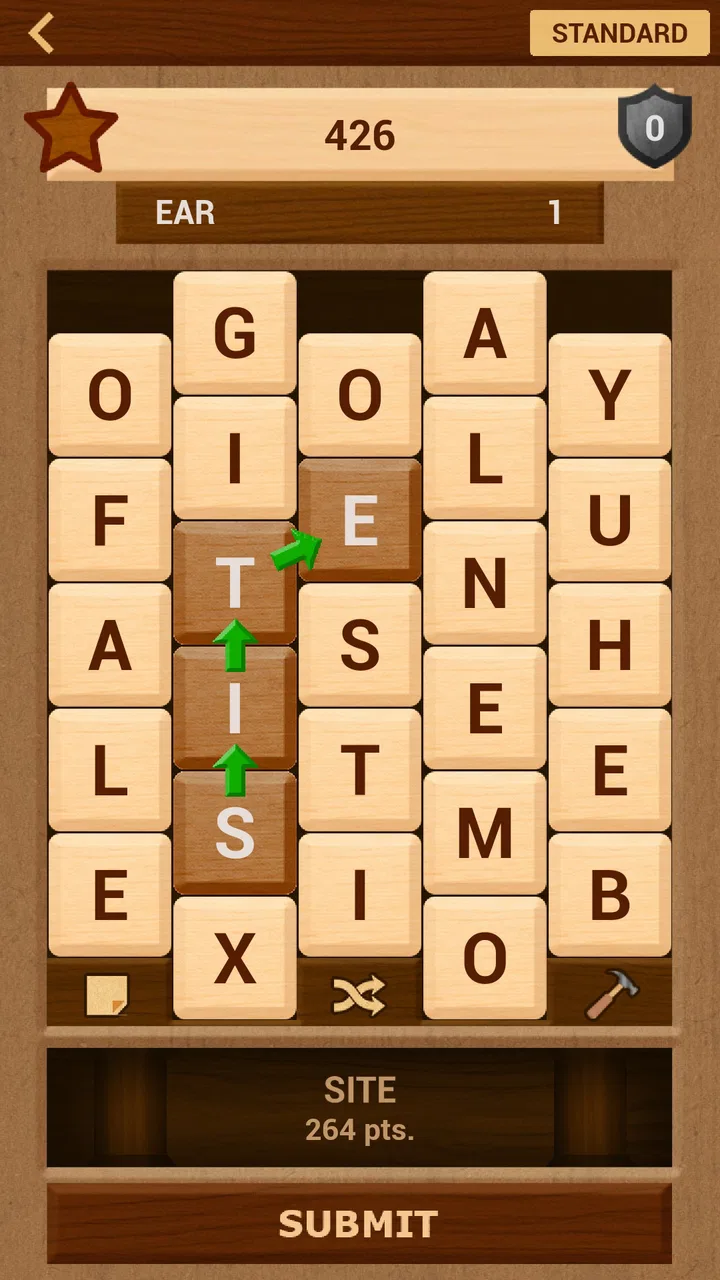
Bookworm Classic - Word Hunt is a word puzzle game in which you create words by connecting adjacent letter tiles on the board. Longer and more unusual words generally produce better scores, while special tiles and bonus mechanics can help you clear the board more efficiently. It is designed for casual play, vocabulary practice, and short sessions without requiring fast reflexes.
02How do you play Bookworm Classic - Word Hunt?
To play, select neighboring letters in sequence to form a valid word, then submit it to remove the tiles and add points to your score. You can usually connect letters in different directions, depending on the board layout and game rules. Planning ahead is important because some tiles may create hazards or make future words more difficult if they are left in the wrong position.
03Is Bookworm Classic - Word Hunt suitable for beginners and children?
The game is generally approachable for beginners because its core objective is simple: find words from the available letters. However, the difficulty can increase as the board changes and the game expects players to recognize less obvious combinations. Children may enjoy it as a vocabulary exercise, but parents should check the app’s age rating, advertising, and any external links before allowing unsupervised use.
04Does Bookworm Classic - Word Hunt require an internet connection?
Whether an internet connection is necessary can depend on the specific version downloaded from the Android or iOS store. Basic puzzle play may work offline in some releases, while advertisements, analytics, updates, leaderboards, or additional features may require connectivity. It is best to test the game in airplane mode after installation and review the store listing for the developer’s current requirements.
05Is Bookworm Classic - Word Hunt free to download?
Bookworm Classic - Word Hunt may be offered as a free download, but availability of advertisements, optional purchases, premium content, or platform-specific pricing can vary between versions. Before installing, review the official store page for in-app purchase details and the privacy information. Also confirm that the publisher is legitimate, since similarly named word games may not be the same application.
Pros
- Simple word-finding gameplay is easy to learn and play casually.
- Classic design offers a nostalgic experience for puzzle fans.
- Short rounds make it convenient for quick gaming sessions.
- Word discovery can help exercise spelling and vocabulary skills.
- Runs well on many devices without demanding advanced hardware.
Cons
- Gameplay may feel repetitive after extended play sessions.
- Some words can be obscure or difficult for casual players.
- Limited visual variety may make the experience feel dated.
- Progress can become frustrating when no useful letter paths appear.
- May lack the depth and features expected from newer word games.

Bookworm Classic - Word Hunt
Gallery